
Shift dashboard
See remaining doses, overdue work, exceptions, and the next three actions before anyone opens a member chart.
What it does
Built for the work on the floor.
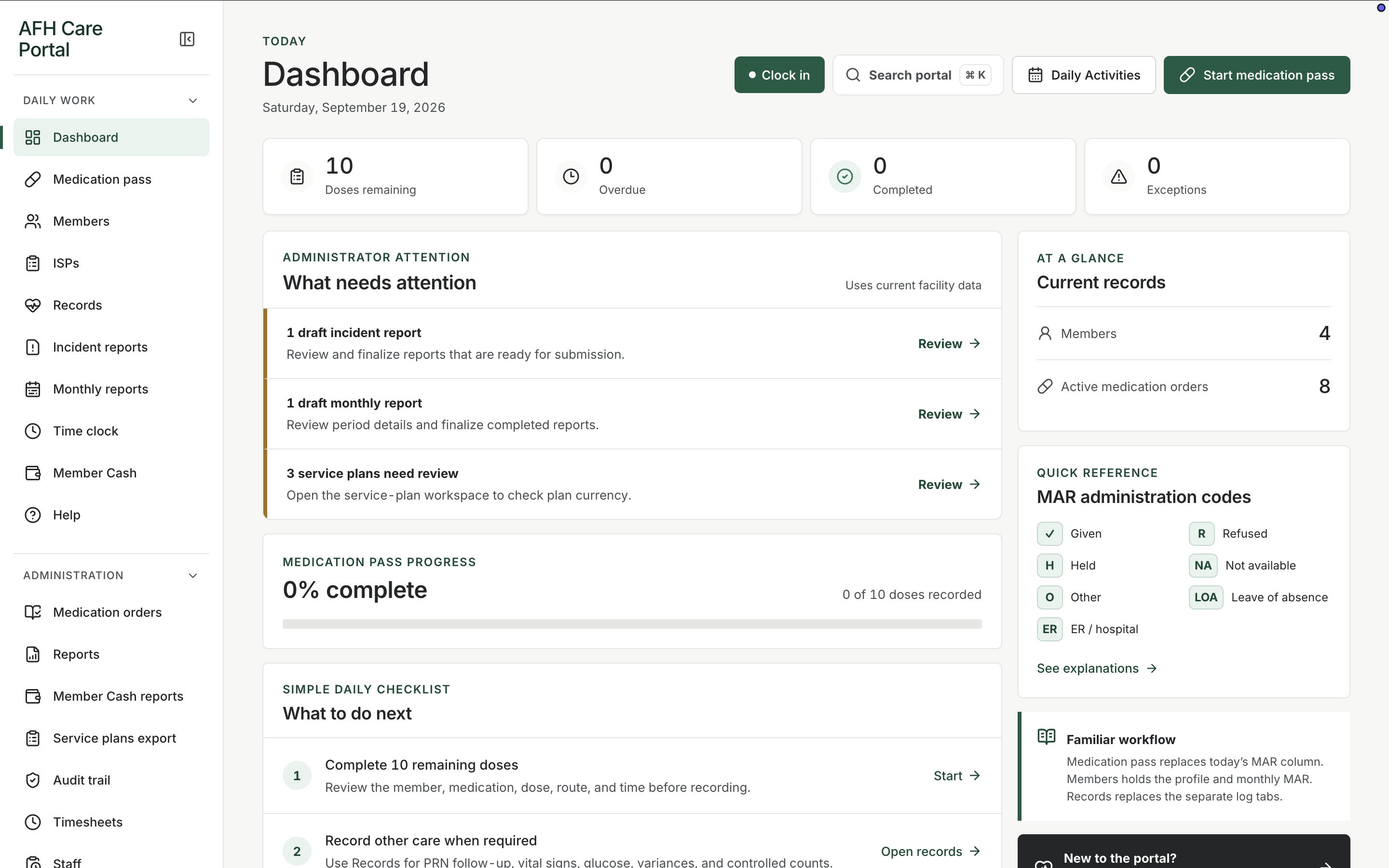
The dashboard is the first screen of a shift. It does not try to be a hospital command center. It answers four practical questions: how many doses are still open, whether anything is overdue, what already happened, and what needs a manager’s eye. Administrator attention sits above the fold so a delayed service plan or an incomplete pass is visible without hunting through menus. A simple checklist then points staff into the medication pass, records, or member profiles. Quick-reference MAR codes stay on the same page so a caregiver does not have to remember whether R means refused or held.
- Today’s medication counts for remaining, overdue, completed, and exceptions
- Administrator attention for work that needs review, such as service-plan currency
- Medication pass progress for the current day
- Checklist links into pass, records, and members
- Current record counts for members and active orders
Open the home, not a pile of lists
Clock-in, search, and start medication pass stay in the header. The four summary cards show remaining, overdue, completed, and exception counts for today using the current facility data.
Follow the next action
The checklist names the work in order: complete remaining doses, record other care when required, then check member information. Each row links into the workspace that actually does that job.
Keep MAR language close
Given, refused, held, not available, other, leave of absence, and ER/hospital codes sit in a quick-reference panel so documentation stays consistent from one caregiver to the next.
Related workspace
Nearby tools in the same portal.
Daily administration
Medication pass
See every member’s standing for the day, then open a person and record the dose, route, time, and outcome.
Resident information
Member profiles
Keep safety context, allergies, diagnoses, orders, incidents, and monthly reporting around the person, not scattered across binders.
Service planning
Individual service plans
Keep each member’s service plan current, reviewable, and close to the daily work that is supposed to follow it.