
Medication pass
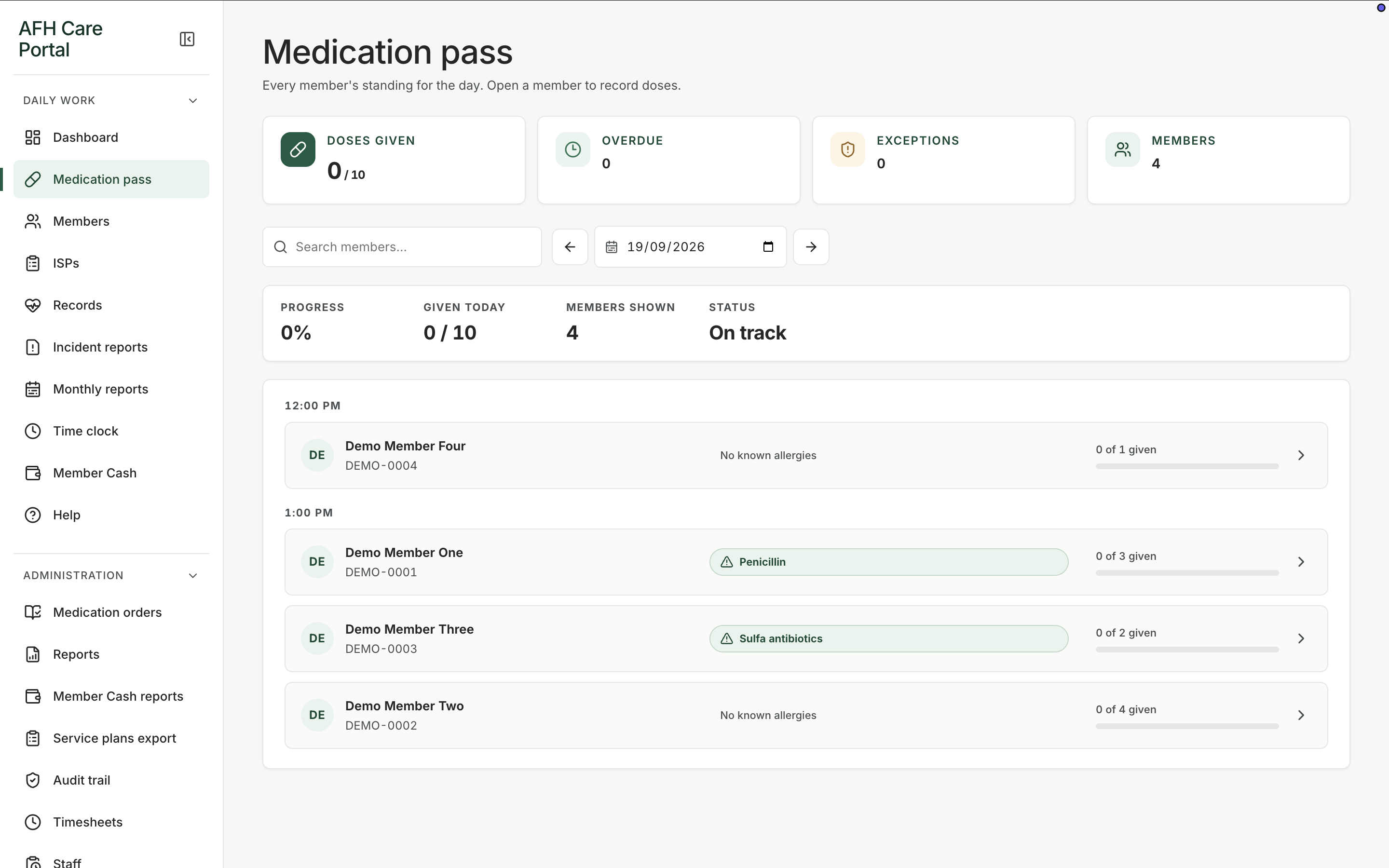
See every member’s standing for the day, then open a person and record the dose, route, time, and outcome.
What it does
Built for the work on the floor.
Medication pass is the working view for administration, not a historical MAR grid. It shows how many doses are given versus remaining, whether anything is overdue, and which members still need a pass. Staff pick a date, search a name, and open a member card that already carries allergies and dose progress. Recording happens in that focused member workspace so the caregiver can confirm the person, the order, the dose, the route, and the time before an outcome is saved. The pass uses the same MAR language as the rest of the portal, so a held or refused dose later appears on the monthly record without a second transcription.
- Date-based pass with previous and next day controls
- Search by member name
- Dose progress, overdue, and exception totals
- Allergy context on the member row
- Outcomes that feed the monthly MAR
Start from the day’s standing
The overview totals given versus remaining doses, overdue counts, exceptions, and how many members are on the pass. A progress bar sits above the timed list so a late morning pass is obvious.
Open one member at a time
Each row shows the member, identifier, allergy flag, and how many doses are already given. Opening the row is how staff record an individual administration.
Keep the outcome with the order
The pass writes into the same order and MAR history used by medication orders and monthly reporting, so the day’s work and the month’s record stay aligned.
Related workspace
Nearby tools in the same portal.
Start of the day
Shift dashboard
See remaining doses, overdue work, exceptions, and the next three actions before anyone opens a member chart.
Resident information
Member profiles
Keep safety context, allergies, diagnoses, orders, incidents, and monthly reporting around the person, not scattered across binders.
Service planning
Individual service plans
Keep each member’s service plan current, reviewable, and close to the daily work that is supposed to follow it.