
Staff and access
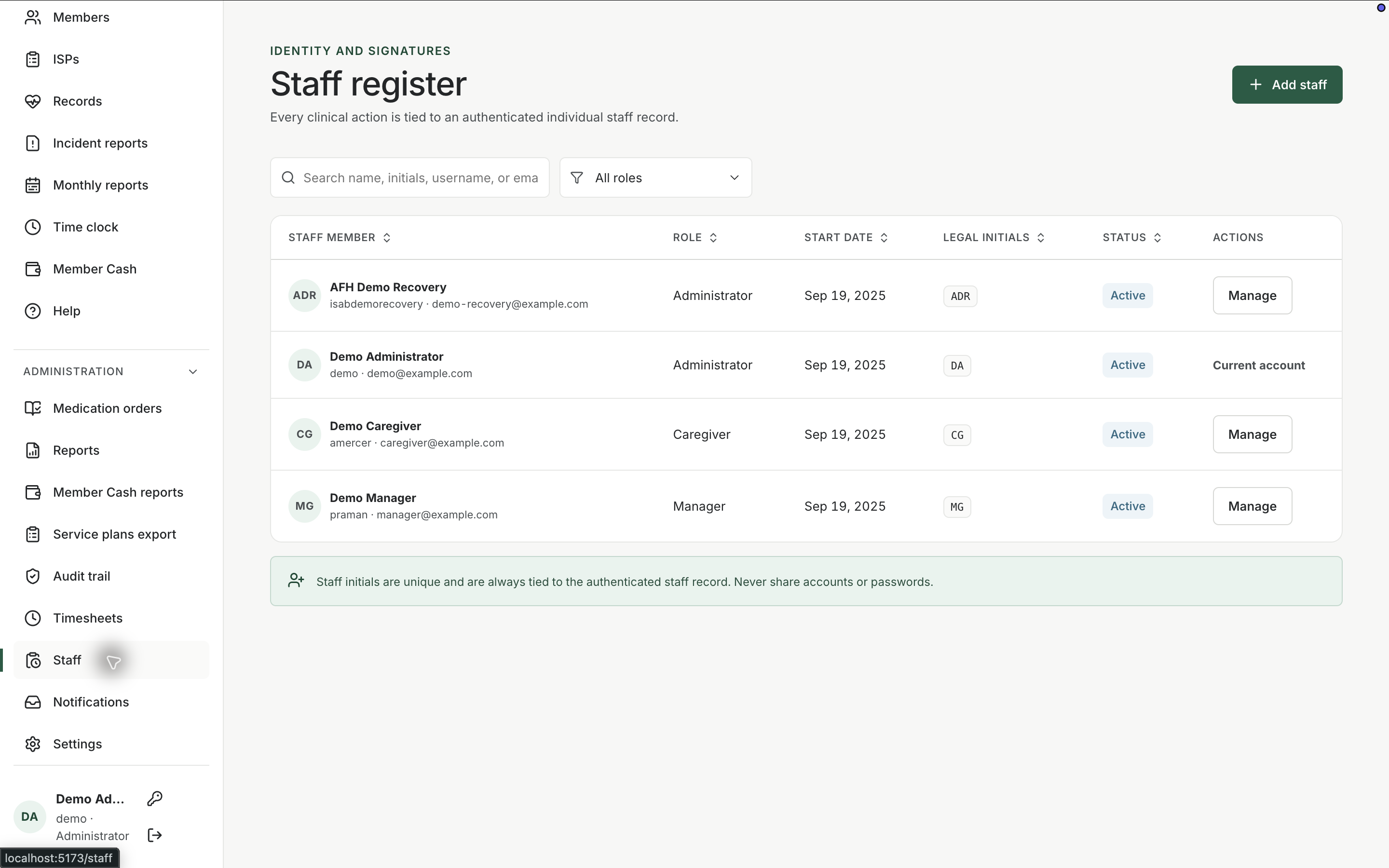
Give each caregiver their own sign-in, keep the roster current, and decide who may administer, review, or manage the home.
What it does
Built for the work on the floor.
Staff is the roster and the access list. The live demo signs in with an individual staff account, not a shared binder password. That matters for MAR initials, audit history, and basic privacy hygiene. Managers add people, keep them active or inactive, and assign the kind of work they are allowed to do. Settings holds home-level configuration; Staff holds the people.
- Individual staff accounts
- Active roster management
- Role-aware access to daily and administrative tools
One person, one sign-in
Caregivers use their own account so recorded actions can be attributed.
Keep the roster honest
Deactivate people who have left. Do not keep a shared login that outlives the last employee who knew it.
Match access to the job
Administration tools stay with people who should see them. Daily work stays available to the floor.
Related workspace
Nearby tools in the same portal.
Active instructions
Medication orders
Keep the medicine, member, directions, schedule, and status in a structured order that the pass can actually follow.
Review and export
Operational reports
Pull care activity into a reviewable report when a manager, family, or licensing conversation needs more than the live screen.
Fund review
Member cash reports
Review personal-fund activity over a period when a family, manager, or audit question needs the ledger in report form.